
Frequently Asked Questions
Residential Connections
Residential Connections
The previous owner/tenant is still occupying the port in my house. Can NetLink Trust (NLT) assist in releasing the port so that I can proceed to subscribe fibre broadband with my Internet Service Provider (ISP)?
When a fibre port at your residential premises remains linked to a former owner or tenant, it is classified as an Unreleased Fibre Issue. In accordance with IMDA's mandated industry process, an Unreleased Fibre Issue can only be resolved through a request submitted by your Internet Service Provider (ISP). NetLink Trust (NLT) cannot process requests made directly by end-users.
To begin, please contact your ISP. After verifying your proof of ownership or tenancy, your ISP will work with NLT and the relevant ISP to resolve the matter according to IMDA’s process. Further details on the resolution process are available in the "Release of Occupied Residential Fibre" FAQ section.
Am I able to install a second Fibre Termination Point (FTP) despite having available ports on my first one?
Please approach your Internet Service Provider (ISP). They will advise you the next course of action and the charges applicable. Once NetLink Trust (NLT) receives the request from your ISP, we will proceed with the installation works.
How do I know which IMDA's COPIF applies to my development?
You can refer to the Urban Redevelopment Authority’s (URA) granted Provisional Permission (PP) or Written Permission (WP) effective date, whichever date is earlier, to determine the COPIF of your development.
For example:
For example:
- If your URA's PP or WP effective date is before 01 May 2013, you will need to comply with COPIF 2008.
- If your URA's PP or WP effective date is on or after 01 May 2013, and before 15 December 2018, you will need to comply with COPIF 2013.
- If your URA's PP or WP effective date is on or after 15 December 2018, you will need to comply with COPIF 2018.
Can I have more than one Termination Point in my household?
|
COPIF 2008 |
COPIF 2013 |
|
Only one Termination Point is required for each household. |
Only one Termination Point is required for each household. |
I am interested to sign up for an installation of Termination Point but I am a tenant. How do I proceed?
|
COPIF 2008 |
COPIF 2013 |
|
You will need written permission from the homeowner before requesting for an optical fibre installation. Please get the homeowner to fill up the homeowner authorisation form before approaching your preferred Internet Service Provider. |
The Termination Point (TP) is to be installed by the building developer or building owner during the building’s construction. Please approach your homeowner if the TP cannot be located. You may approach your preferred Internet Service Provider to sign up for fibre broadband services thereafter. |
Can I arrange for my own contractor to install the Termination Point?
|
COPIF2008 |
COPIF 2013 / COPIF 2018 |
|
Only NetLink Trust’s appointed contractors can conduct the installation. If you require NetLink Trust to install, relocate, repair, replace, or remove your Fibre Termination Point (FTP), please contact your Internet Service Provider (ISP) to book an appointment, or visit our self-service portal. For step-by-step instructions, please refer to our Quick Start Guide |
The Termination Point (TP) is to be installed by the building developer or building owner during construction. Hence, you do not need to get NetLink Trust to install the TP.
|
I have my own fibre cable. Can your contractor use my fibre cable instead?
|
COPIF 2008 |
COPIF 2013 |
|
You must use the fibre cable supplied by our appointed contractor on the day of the installation. If homeowners insist on using their own fibre cable, our contractor shall halt the installation. |
The Termination Point (TP) is to be installed by the building developer or building owner during the building’s construction. Hence, there is no need for you to arrange for NetLink Trust to install the TP. Please ensure that your fibre cable complies with standards listed in the COPIF 2013. |
I intend to renovate my home in the near future. What do I need to know?
|
COPIF 2008 |
COPIF 2013 |
|
You are encouraged to install structured cabling (min Cat 5 cables) during your renovation. The structured cabling should be connected to a utility closet or a location that meets the following requirements:
If you do not intend to have structured cabling, the TP will be installed in the living room next to the Cable TV / MATV point with an Electrical Point. |
You are encouraged to retain the existing Termination Point (TP) and structured cabling provided by your developer, wherever possible. Should relocation of the TP be required, please engage NetLink Trust or your preferred licensed telecommunication wiring contractor directly. You are encouraged to retain the existing TP and structured cabling provided by your developer, wherever possible. |
Where can I submit my building and telecommunication facility plans?
You can submit your building and telecommunication facility plans via the Building Construction Authority's CORENET e-Submission system - https://www.corenet2-ess.gov.sg.
What are the available methods for Termination Point installation?
|
COPIF 2008 |
COPIF 2013 |
|
Once the optical fibre is installed into your home, you are free to choose any of the following methods to install the Termination Point (TP).
For Condominiums / HDBs / High Rise Residential Homes:
For Landed Homes:
Access Panel / False Ceiling Opening:
d. Existing trunking
|
The Termination Point will be installed by the building developer or building owner during the building construction phase. |
What is a Termination Point and where should I install the Termination Point?
|
COPIF 2008 |
COPIF 2013 |
|
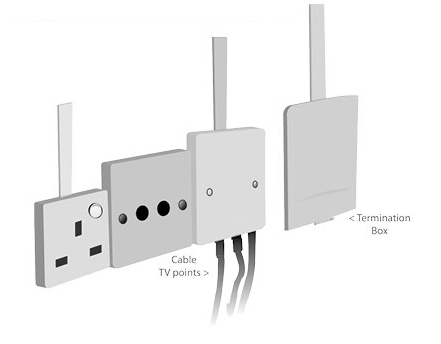
A Termination Point (TP) is a small box (H125mm x W80mm x D20mm) whereby NetLink Trust will terminate the optical fibre in your home. Only one TP is required per home. Kindly leave a gap of at least 75mm between the Termination Box and utility outlets and/or structures. Every Termination Box will come with an anti-tampering seal, and will be considered tampered if the seal is broken. A replacement and/or repair fee will apply. If your premises is structured data cabling ready, we recommend that the TP be installed in the utility closet or a location that meets the following requirements:
For premises without structured data cabling, NetLink Trust recommends installing the TP in the living room, next to the Cable TV / Master Antennas TV (MATV) with electrical point so that it can support data, video and TV services. If you choose to install the TP at a location that does not meet the given recommendations, please note that NetLink Trust will charge a fee for any subsequent requests to relocate the TP and will only carry out surface trunking works. |
A Termination Point (TP) is a small wall mounted box whereby the optical fibre is terminated in your home. The Termination Point (TP) is installed by the building developer or building owner during the building construction phase. The TP will typically be located at a utility closet or a location that meets the following requirements:
|
What is the duration of a typical installation?
|
COPIF 2008 |
COPIF 2013 |
|
HDB Flats For installations at HDB blocks, a typical installation session should take about two (2) hours. Approximately two (2) NetLink Trust’s appointed contractors will be involved in the installation. Condominiums For installations at condominiums and private apartments, a typical installation session should take about two (2) hours. Approximately two (2) NetLink Trust’s appointed contractors will be involved in the installation. Landed Properties For installations at landed properties, NetLink Trust’s appointed contractor will first test the underground pipe to ensure that it is not choked. If the pipe blockage occurs within your compound Should you opt to install the optical fibre cable via surface conduit from the gate post or point of entry into your home, a typical installation session should take about four (4) hours. Approximately six (6) NetLink Trust’s appointed contractors will be involved in the installation. If the pipe blockage occurs outside your premises NetLink Trust’s appointed contractor will submit the necessary permits needed to clear the blockage to the relevant authorities. Please note that this process may take up to 3 months. Once the permits have been approved, our appointed contractor will contact you within 1 month to carry out the installation. If the pipe blockage occurs both within and outside your premises The blockage located within your compound will need to be cleared first. Once the blockage located within your compound is cleared, please inform NetLink Trust’s appointed contractor so that we can apply for the necessary permits needed to clear the blockage located outside your premises. |
The Termination Point will be installed by the building developer or building owner during the building’s construction. |
What are the installation time slots available?
|
COPIF 2008 |
COPIF 2013 |
|
A typical installation is conducted between 9am to 6pm, Mondays to Fridays, excluding Public Holidays. Please contact your Internet Service Provider to schedule for an installation appointment. |
Not Applicable |
I have an appointment scheduled, but I am not able to oversee the installation physically, what should I do?
As a homeowner, you should be present during installation. Alternatively, you may authorise a person aged 18 years old and above to supervise the installation. Please complete and upload the Owner Authorisation Form when submitting the appointment booking form. If you have left out the Owner Authorisation Form during booking, please upload the completed form in the "Contact Us" page, under the "Homeowners" category again.
How will fibre be installed in my home if it is a new development?
|
COPIF 2008 |
COPIF 2013 |
|
Residential units will already provide an empty conduit. NetLink Trust will use this empty conduit to install the fibre cable into the unit. |
The Termination Point will be installed by the building developer or building owner during construction. |
What should I do prior to the installation appointment?
Please ensure that the designated location for installation is accessible by our contractors as they are not obligated to move or shift any furniture/personal effects on your behalf. Please make sure these items are well protected before our contractors arrive. If you request for our contractors' assistance in moving or shifting any furniture/other personal effects, neither NetLink Trust nor our contractors shall be liable for any damage to your property. The following must be observed prior to rendering assistance:
- Allow NetLink Trust or our contractors to take photographs of the furniture and its surrounding before and after the move or shift
- You will need to acknowledge the agreement in the Fibre Installation Service Form (SRF)
Why is NetLink Trust providing only 15 metres of optical fibre?
|
COPIF 2008 |
COPIF 2013 |
|
Based on our experience, 15 metres is adequate for the installation of fibre to the living room for most homes. A fee of SGD1.09 per additional 5-metre block (inclusive of GST) will be charged if the total optical fibre cable needed exceeds 15 metres. |
Not Applicable |
What is the process of installation?
Please refer to our Installation Service guide.
Who should I contact if the Termination Point and/or optical fibre cable is damaged?
Please contact your Internet Service Provider (ISP) to book an appointment to repair or replace your Fibre Termination Point (FTP) or visit our self-service portal. For step-by-step instructions, please refer to our Quick Start Guide.
How do I remove NetLink Trust’s optical fibre and Termination Point from my home?
If your Fibre Termination Point (FTP) was installed by NetLink Trust, please use our self-service portal to book an appointment for removal. For step-by-step instructions, please refer to our Quick Start Guide.
If your FTP was installed by the building developer or your own contractor, you are encouraged to retain the existing FTP and structured cabling. You may also remove them on your own.
If your FTP was installed by the building developer or your own contractor, you are encouraged to retain the existing FTP and structured cabling. You may also remove them on your own.
I am relocating to new premises. How do I transfer my fibre service to the new location?
Please contact your Internet Service Provider (ISP) to submit a relocation request. Your ISP will advise you on the relocation process, applicable charges (if any), and the available appointment dates. Once NetLink Trust receives the relocation request from your ISP, we will arrange for the fibre connection at your new premises on the confirmed appointment date.
What happens when I submit a relocation request?
Your fibre connection will be installed at your new premises on your scheduled relocation date. Once the fibre connection at your new premises has been successfully established, the fibre connection at your existing premises will be automatically terminated on the same day as part of the relocation process.
Can I continue to use my fibre broadband service at my existing premises after the relocation is completed?
No. A relocation order transfers your existing fibre connection to your new premises. Once the fibre connection at your new premises has been successfully established, the fibre connection at your existing premises will be automatically terminated on the same day.
Can I use fibre broadband at both my existing and new premises during my move?
No. A relocation order is intended to transfer a single fibre connection from your existing premises to your new premises. It does not support fibre services being active at both premises at the same time. If you require fibre broadband services at both locations concurrently, please contact your Internet Service Provider (ISP) to discuss the available options.
When will my fibre broadband service be available at my new premises?
Your fibre connection will be available once the fibre installation at your new premises has been successfully completed. Your Internet Service Provider (ISP) will advise you when your broadband service is ready for use, including the activation of any broadband equipment, where applicable.
Why is my existing fibre connection disconnected after my new connection is installed?
A relocation order is designed to transfer your fibre connection from your existing premises to your new premises. Once the fibre connection at your new premises has been successfully established, the relocation is considered complete and the fibre connection at your existing premises will be automatically terminated on the same day.
What should I do if I need internet access at my existing premises after my relocation appointment?
If you require internet access at your existing premises beyond your scheduled relocation appointment, please contact your Internet Service Provider (ISP) before submitting or proceeding with your relocation request. Your Internet Service Provider (ISP) will be able to advise you on the available service options based on your requirements.
I relocated my service previously and was able to continue using fibre broadband at my old address for a short period after moving. Why is this no longer available?
NetLink Trust has aligned the relocation process with its intended operational workflow. Under the current relocation process, once the fibre connection at your new premises has been successfully established, the fibre connection at your existing premises will be automatically terminated on the same day as part of the relocation process. If you require fibre services at both premises concurrently, please contact your Internet Service Provider (ISP) to discuss the available options before submitting your relocation request.
Can NetLink Trust guarantee that my fibre service will be ready at my new address on my relocation appointment date?
NetLink Trust will make every reasonable effort to complete the fibre connection on the confirmed appointment date. However, as with any appointment, unforeseen circumstances such as access issues, infrastructure constraints or other operational factors may occasionally affect the completion of the connection. If there are any changes to your appointment, your Internet Service Provider (ISP) will keep you informed and advise you on the next available appointment.
Can I request a specific installation time so that my Internet Service Provider (ISP) can activate my broadband service immediately afterwards?
Installation appointments are scheduled based on the available appointment slots. Please check with your Internet Service Provider (ISP) on the available appointment timings and coordinate any subsequent appointments, such as the installation or activation of your broadband equipment, directly with them.
What happens if my fibre installation at the new address is delayed on my relocation appointment date?
NetLink Trust will make every reasonable effort to complete your fibre installation on the scheduled appointment date. However, if unforeseen circumstances prevent the installation from being completed as planned, your Internet Service Provider (ISP) will be informed and will update you on the revised appointment arrangements and the next steps for activating your broadband service.
Do I have to pay for installation of the Termination Point? How would the charges be billed to me?
|
COPIF 2008 |
COPIF 2013 |
|
Installation of the Termination Point (TP) is chargeable at SGD 182.03 (inclusive of GST) for high-rise premises and SGD 333.54 (inclusive of GST) for landed properties. If you have sent your installation request through your Internet Service Provider (ISP), please check with them on the payment. If you have sent your request directly to NetLink Trust, payment must be made online before the confirmation of booking. Please contact our customer service team by completing the form in the "Contact Us" page, under the "Homeowners" category for an installation appointment. |
The Termination Point (TP) will be installed by the building developer or building owner during construction. For any subsequent repair, replacement or relocation of the TP, you may engage your preferred licensed telecommunications wiring contractor directly. |
How much do I have to pay for additional optical fibre?
|
COPIF 2008 |
COPIF 2013 |
|
If fibre run beyond the first 15 metres (measured from point of entry into the Residential Premises to the Termination Point) for Buildings fitted with end-to-end NetLink Trust's fibre infrastructure, an additional fee of SGD 1.09 (inclusive of GST) per 5-metre block will be charged. |
If fibre run beyond the first 25 metres (measured from Fibre Interface Point of the Residential Premises to the Termination Point) for Buildings fitted with building owner/building developer's network, an additional fee of SGD 1.09 (inclusive of GST) per 5-metre block will be charged. |
