
Frequently Asked Questions
General
General
What is the Nationwide Broadband Network (NBN)?
NBN is the wired network in Singapore’s Intelligent Nation 2015 (iN2015) masterplan. It is envisioned to provide open access and eventually ultra-high speed broadband access of more than 1Gbps to all physical addresses in Singapore, including homes, schools, businesses and hospitals.
NBN is structured into three layers.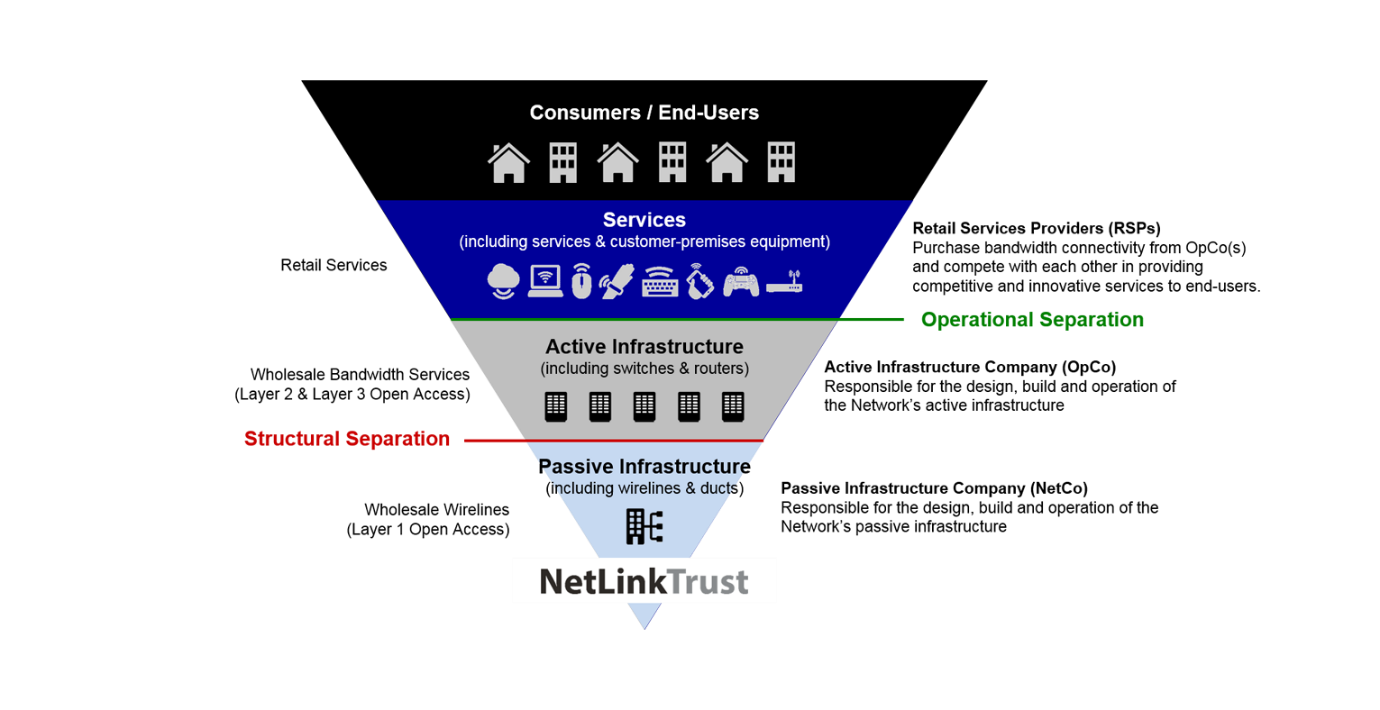
The Info-communications Media Development Authority of Singapore has appointed NetLink Trust to lay the passive network infrastructure of NBN.
What are the benefits of NBN?
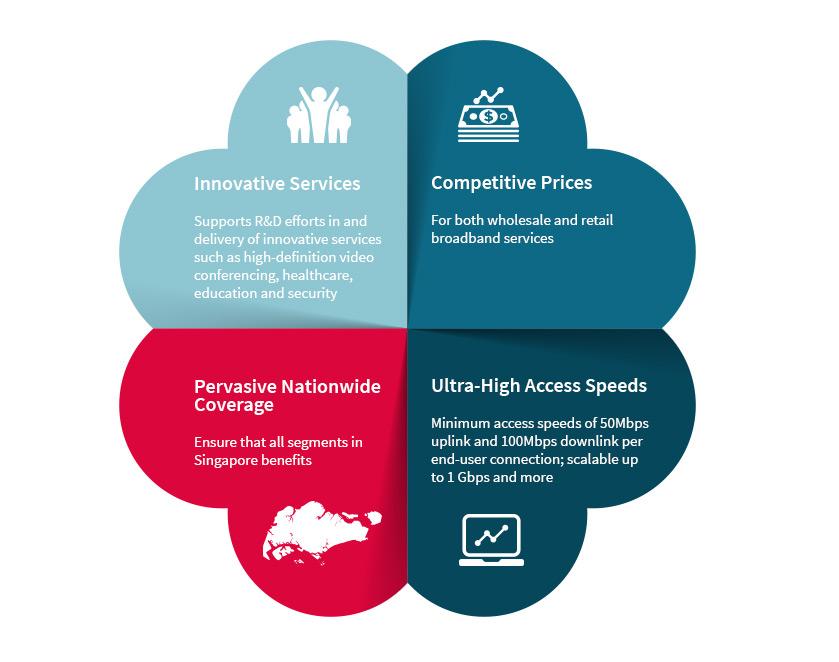
Consumers and businesses can look forward to more competitive prices, ultra-high access speeds, pervasive nationwide coverage and more innovative services.
How fast is internet access via optic fibre?
Internet speeds can easily scale to 1Gbps and beyond with the use of optical fibre as optical network equipment technology advances. Internet speed depends on the packages offered by your Internet Service Provider.
What affects the download and upload speeds when using the fibre optics?
>The optical fibre cable is capable of enormous bandwidth capacity as a medium. The download and upload speed that a user encounters would be dependent on factors such as the servers’ connection speed, where the servers are hosted, the number of users accessing the servers and overseas connection bandwidth, etc.
Does NetLink Trust provide a warranty for Termination Points installed? Are there any charges for the repair of faulty points?
All Termination Points (TP) installed by NetLink Trust undergo rigorous acceptance tests to ensure they meet operational specifications. If you experience any service disruption suspected to be caused by a faulty point, please contact your Internet Service Provider (ISP) for initial checks. They will coordinate with NetLink Trust for troubleshooting if necessary.
For faults within the NetLink Trust network, all repair and restoration are covered by us. However, if the issue is attributed to cable damage within your premises, repair charges will apply.
How can I care for and maintain my Termination Point and fibre optic cable?
For your safety, all Termination Points and fibre optic cables should not be exposed to water, including dripping or splashing, and no objects filled with liquids, such as vases, should be placed on them.

Avoid folding, knotting or bending the fibre at hard angles. At least 12 inches of cable should be kept straight coming out of the illuminator before any large bends.

Avoid placing heavy objects on the fibre optic cable as this can damage the fibre optics encased within.

Keep fibre optic cables away from places where it may be rolled over or damaged.

To prevent injury, you are advised to refrain from looking directly into the fibre or the fibre port.

Avoid wiping down the Termination Point with abrasive material or solvents to prevent damaging it.

Do not paint over the Termination Point.
My internet connection seemed to be unstable, can NetLink Trust (NLT) send your technicians to rectify the issue as I need to use the internet urgently?
Please approach your Internet Service Provider (ISP) for further checks. If necessary, your ISP will raise a Fault Ticket and we will work with them to resolve the issue.
How do I check the status of my Fault Ticket?
Please approach your Internet Service Provider (ISP) and they will advise you on the status of your ticket.
How do I extend the range of the wifi broadband signal in my premises?
WiFi signal and performance depend on a variety of factors, for instance, the number of connecting devices and the size/layout of your premises. We recommend the following best practices:
- Place your router(s) in an open space, for example, on a TV console and/or close to the area where you always use the WiFi, instead of an enclosed area like cabinet, store room or bomb shelter
- Regularly upgrade your router firmware
- Deploy “extenders” or additional router(s) for larger premises and/or premises with special layout
- Contact your Internet Service Provider for more information on the available options
How do I request a refund if the fault rectification work is not carried out?
If you believe that the fault rectification work was not carried out, please contact our customer service team by completing the form in the "Contact Us" page, under the "Homeowners" category to initiate an investigation. If the investigation confirmed that no work was done, a refund will be given within three weeks.
How do I know if the SGQR code given by your Field Engineer is legitimate?
After you have scanned the SGQR code, the screen will display a message showing payment will be made to “NETLINK MANGEMENT PTE. LTD. (AS TRUSTEE OF NETLINK TRUST).” If you have any doubts, please contact our customer service team by completing the form in the "Contact Us" page, under the Homeowners" category.
What should I do if I suspect that the SGQR code is fraudulent?
If you suspect any fraudulent activity, please do not proceed with payment. Contact our customer service team by completing the form in the "Contact Us" page, under the "Homeowners" category to verify the authenticity of the SGQR code.
Why is NetLink Trust's Field Engineer asking me for a payment?
Our Field Engineer has determined that the fault is attributed to cable damage within your premises, hence, our repair charges will apply.
Alternatively, you may approach any of the NBN contractors to carry out the fault rectification work. For the avoidance of doubt, NetLink Trust will not carry out any repair and replacement work if you do not agree to pay for the relevant charges.
What charges are applicable to me?
|
Description of Charges |
Price (inclusive of GST) |
|
TP Replacement/Relocation/Repair/Removal in High-Rise Residential Premises |
184.21 |
|
TP Replacement/Relocation/Repair/Removal in Landed Residential Premises |
336.81 |
|
TP RRR CO to TP inside Non-Residential Premises |
625.66 |
I already have the Termination Point installed. What should I do next?
|
COPIF 2008 |
COPIF 2013 |
|
You may contact your preferred Internet Service Provider to sign up for fibre broadband service. |
You may contact your preferred Internet Service Provider to sign up for fibre broadband service. |
I have been getting unstable connection speeds ever since I took up the fibre broadband service.
|
COPIF 2008 |
COPIF 2013 |
|
Please liaise with your Internet Service Provider on service-related matters. |
Please liaise with your Internet Service Provider on service-related matters. |
What are my home networking options to extend my optical fibre broadband experience?
|
COPIF 2008 |
COPIF 2013 |
|
You can choose to connect your home with the following networking options:
Home networking equipment such as the router is connected to the Optical Network Terminal (ONT), which will be provided by your Internet Service Provider when you subscribe to its services. Home networking equipment cannot be plugged directly into NetLink Trust’s Termination Point. Only the ONT can be connected to the Termination Point. You may also check with your preferred Internet Service Provider regarding your connections and networking options. |
You can choose to connect your home with the following networking options:
Home networking equipment such as the router is connected to the Optical Network Terminal (ONT), which will be provided by your Internet Service Provider when you subscribe to its services. Home networking equipment cannot be plugged directly into NetLink Trust’s Termination Point. Only the ONT can be connected to the Termination Point. You may also check with your preferred Internet Service Provider regarding your connections and networking options. |
